Macro Express Pro 4.3.0.1
Updated on 07 Feb 2012
By Anthony Buckner
By Anthony Buckner
Specifications
License:
Time-limited trial (Free to try)
Updated:
Downloads:
222
Platform:
Windows All
Publisher:
(more)
Website:
User Reviews:
Other versions:
Do you like
Macro Express Pro?
Macro Express Pro?
Publisher's Descriptions
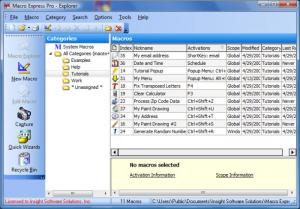
With Macro Express Pro you can create timesaving macros for specific applications and global macros that will work with any Windows program. Dozens of wizards are available to help you create the macros that will let you automate common computer tasks, including typing text, launching Web sites, downloading files, and creating reminders. You will be able to launch macros by short keys, hot keys, pop-up menu, a window title, or via a timed schedule.
Macro Express also supports the ability to send email. The email feature includes a built-in address book and a wizard that will prompt you for all options, including optional dial-up networking connection. Macro Express is an incredibly powerful macro recorder and playback utility. Automate all of your common tasks by simply turning on the recorder, performing the actions one time, then calling up the macro when needed. Better yet, use one of several available wizards to create your macros.
Macro Express will insert text or dates; launch programs and Websites; control your mouse; insert symbols, dates, or time; execute delays, pauses, and repeat loops; cut and paste to the Clipboard; perform window commands; and lots more. It's difficult to imagine a task that Macro Express can't automate. Use it globally or for specific programs, launching macros via Hot Key, ShortKey, mouse clicks, a pop-up menu, or a timed schedule. Create wizards, use the scripting editor, and more. For more powerful and complex macros, it's easy to create if/then/else logic that examines variables and makes decisions based upon what it finds.
The macros that you create can pause, wait for input, perform loop logic, resize windows, manipulate clipboard data, and make complex decisions.
Macro Express also supports the ability to send email. The email feature includes a built-in address book and a wizard that will prompt you for all options, including optional dial-up networking connection. Macro Express is an incredibly powerful macro recorder and playback utility. Automate all of your common tasks by simply turning on the recorder, performing the actions one time, then calling up the macro when needed. Better yet, use one of several available wizards to create your macros.
Macro Express will insert text or dates; launch programs and Websites; control your mouse; insert symbols, dates, or time; execute delays, pauses, and repeat loops; cut and paste to the Clipboard; perform window commands; and lots more. It's difficult to imagine a task that Macro Express can't automate. Use it globally or for specific programs, launching macros via Hot Key, ShortKey, mouse clicks, a pop-up menu, or a timed schedule. Create wizards, use the scripting editor, and more. For more powerful and complex macros, it's easy to create if/then/else logic that examines variables and makes decisions based upon what it finds.
The macros that you create can pause, wait for input, perform loop logic, resize windows, manipulate clipboard data, and make complex decisions.
What's New
Enhancements
Added the ability to edit a macro specified in a 'Macro Run' command from the right-click menu of the script editor. This feature requires that the macro explorer be open in the background.
Standardized the Find/Replace dialogs in Macro Explorer, Script Editor and the External Script command.
Pressing the Enter key in the Script Editor's Search box performs the search.
The last 10 entries in the find dialogs are now remembered and reusable.
Added the 'Do not process embedded variables' option to many of the 'Variable Set String' and 'Variable Modify String' commands.
Revised the External Script command. It is now resizable, has improved syntax highlighting, added a new 'Insert Encoded Variable' button and variables can now be encoded to prevent automatic expansion.
External Script Command: Added Ctrl+F to Search, F3 to Search Next, Shift+F3 to Search Previous and Ctrl+H to Replace.
Added encoding of variables to the 'External Script' command. Variables entered like this {%}Variable{%} are not replaced with the content of the variable and are changed to %Variable% prior to the code that runs the script.
Added encoding of variables to the 'Run Macro In Variable' command. Variables entered like this {%}Variable{%} are not replaced with the content of the variable and are changed to %Variable% prior to the code that runs the macro.
Added 'Close open macro files before loading another macro file' option to the preferences that will close open macro files when another macro file is opened.
Added an option to not allow a floating menu to close.
Added an option to not close a popup menu after running a macro.
Modified the program so that it will work correctly with a macro file that is read-only.
All open macro files are now included in the list of most recently used macro files.
Added a registry entry to allow more items in the most recently used list of macro files.
When another macro file is loaded into Macro Explorer, that macro file is selected and highlighted.
Rearranged the Clear Variables dialog to make its functionality clearer.
Made a modification to the 'Website' command to make the 'wait for webpage' option more reliable.
The clipboard hook is now disabled by default. If you create a macro that requires the clipboard hook you will be prompted to enable the hook.
The keyboard remapping hook is now off by default. The user will now be prompted to enable it if a change is made in the keyboard remapping tool.
Added an advanced option to disable mutexes in the hooks to optimize CPU utilization.
Made a change to allow an icon file to be included in the folder containing the macro file and continue to work if the folder containing both is changed.
When a Macro Express 3 macro file is converted to Macro Express Pro a backup copy of the original macro file is created.
Added the 'Transfer Mode' option to the FTP Get Filesize command.
Made a change to display better error messages for the 'FTP Site Connect' command.
When importing a program configuration file that contains entries that are not normally in the preferences, those non-standard values will be saved in the $Unknown registry key.
Improved support for non-default DPI settings on Windows 7 and Vista.
Updated the 'Directory Modification' activation to make it more reliable.
Bugs Fixed
Fixed a bug rounding negative numbers.
Fixed a bug where the list of macros in the Macro Explorer window could get confused.
Fixed a bug in the explorer where the icons would get confused.
Fixed a bug in the explorer where changing the sort order would sometimes not refresh the macro list correctly.
Fixed a bug with the Clear Variables clear all variables command.
Fixed a bug in the Date/Time prompt where a variable used in the prompt text would not be properly expanded.
Fixed an issue with TCP/IP activated macros that was caused by Microsoft Security patch.
Fixed a lockup that occurred when using the 'Load New Macro File' command when an open macro file contains a 'TCP/IP' activated macro.
Fixed a handle leak in the mouse hook.
Fixed a problem exporting and importing the program configuration when a value in the preferences contains certain special characters.
Fixed a bug in the menu builder where the icons would get confused.
Fixed a bug where the menu builder would get confused about the menu's structure.
Pressing F1 when the Macro Explorer Find dialog is displayed now brings up the correct help topic.
The Command Line Parameter in the Preferences is now properly stored in the startup shortcut.
Fixed a bug in the 'Windows/Programs' command category where commands that use a window title were not giving priority to visible windows over hidden windows.
Fixed a bug in the 'Minimize to system tray' command where the icon in the system tray was blank.
Fixed a bug that occurred when a program was minimized to the system tray where the hint was missing a character.
The macro nickname is now correctly displayed on the macro tab when creating a popup or floating menu macro.
Fixed a bug where the popup menu icons in the notification would get confused.
Fixed a bug where the debug variables dialog did not clear out the old values when starting a second test run of a macro.
Fixed a bug where the 'Variable Set String: Prompt for filename' respected the user's initial directory but did not remember the default filename.
Fixed a bug in the 'Variable Set String to the content of a file' that could occur when using the 'Strip the trailing CR/LF characters' option.
Fixed a conversion error that could cause the converter to become stuck in an infinite loop.
Fixed a bug where it was possible to enter an infinite loop if a variable is set to a string that contains the name of the variable that is being set.
Made a change to resolve issues that occurred when the program shuts down.
Fixed an issue that could occur when a macro is edited by users in different time zones.
Fixed a problem that could occur when running multiple External Script commands at the same time.
Removed the 'Prompt to associate files at program startup' option from the Dialogs area of the preferences when running on Windows 7, Vista and later.
Added a missing space to the 'Variable Set String to Environment Variable' in the script editor.
A variable may now be used in the Filename field of the Log Errors command.
Fixed the title of the 'Variable Set From Decimal' command's 'Set Position Manually' dialog.
Crashes Fixed
Fixed the cause of a crash that could occur when two 'Text Type' commands were placed next to each other in the script.
Fixed a bug in the 'Repeat Counter' command that caused a crash when the command is used outside of a repeat loop.
Fixed a crash caused by aborting the 'Repeat With Windows' command.
Fixed reported security vulnerability that caused a crash when a malformed .mxe file is imported.
Fixed a crash that occurred when trying to run a malformed MXE file.
Added the ability to edit a macro specified in a 'Macro Run' command from the right-click menu of the script editor. This feature requires that the macro explorer be open in the background.
Standardized the Find/Replace dialogs in Macro Explorer, Script Editor and the External Script command.
Pressing the Enter key in the Script Editor's Search box performs the search.
The last 10 entries in the find dialogs are now remembered and reusable.
Added the 'Do not process embedded variables' option to many of the 'Variable Set String' and 'Variable Modify String' commands.
Revised the External Script command. It is now resizable, has improved syntax highlighting, added a new 'Insert Encoded Variable' button and variables can now be encoded to prevent automatic expansion.
External Script Command: Added Ctrl+F to Search, F3 to Search Next, Shift+F3 to Search Previous and Ctrl+H to Replace.
Added encoding of variables to the 'External Script' command. Variables entered like this {%}Variable{%} are not replaced with the content of the variable and are changed to %Variable% prior to the code that runs the script.
Added encoding of variables to the 'Run Macro In Variable' command. Variables entered like this {%}Variable{%} are not replaced with the content of the variable and are changed to %Variable% prior to the code that runs the macro.
Added 'Close open macro files before loading another macro file' option to the preferences that will close open macro files when another macro file is opened.
Added an option to not allow a floating menu to close.
Added an option to not close a popup menu after running a macro.
Modified the program so that it will work correctly with a macro file that is read-only.
All open macro files are now included in the list of most recently used macro files.
Added a registry entry to allow more items in the most recently used list of macro files.
When another macro file is loaded into Macro Explorer, that macro file is selected and highlighted.
Rearranged the Clear Variables dialog to make its functionality clearer.
Made a modification to the 'Website' command to make the 'wait for webpage' option more reliable.
The clipboard hook is now disabled by default. If you create a macro that requires the clipboard hook you will be prompted to enable the hook.
The keyboard remapping hook is now off by default. The user will now be prompted to enable it if a change is made in the keyboard remapping tool.
Added an advanced option to disable mutexes in the hooks to optimize CPU utilization.
Made a change to allow an icon file to be included in the folder containing the macro file and continue to work if the folder containing both is changed.
When a Macro Express 3 macro file is converted to Macro Express Pro a backup copy of the original macro file is created.
Added the 'Transfer Mode' option to the FTP Get Filesize command.
Made a change to display better error messages for the 'FTP Site Connect' command.
When importing a program configuration file that contains entries that are not normally in the preferences, those non-standard values will be saved in the $Unknown registry key.
Improved support for non-default DPI settings on Windows 7 and Vista.
Updated the 'Directory Modification' activation to make it more reliable.
Bugs Fixed
Fixed a bug rounding negative numbers.
Fixed a bug where the list of macros in the Macro Explorer window could get confused.
Fixed a bug in the explorer where the icons would get confused.
Fixed a bug in the explorer where changing the sort order would sometimes not refresh the macro list correctly.
Fixed a bug with the Clear Variables clear all variables command.
Fixed a bug in the Date/Time prompt where a variable used in the prompt text would not be properly expanded.
Fixed an issue with TCP/IP activated macros that was caused by Microsoft Security patch.
Fixed a lockup that occurred when using the 'Load New Macro File' command when an open macro file contains a 'TCP/IP' activated macro.
Fixed a handle leak in the mouse hook.
Fixed a problem exporting and importing the program configuration when a value in the preferences contains certain special characters.
Fixed a bug in the menu builder where the icons would get confused.
Fixed a bug where the menu builder would get confused about the menu's structure.
Pressing F1 when the Macro Explorer Find dialog is displayed now brings up the correct help topic.
The Command Line Parameter in the Preferences is now properly stored in the startup shortcut.
Fixed a bug in the 'Windows/Programs' command category where commands that use a window title were not giving priority to visible windows over hidden windows.
Fixed a bug in the 'Minimize to system tray' command where the icon in the system tray was blank.
Fixed a bug that occurred when a program was minimized to the system tray where the hint was missing a character.
The macro nickname is now correctly displayed on the macro tab when creating a popup or floating menu macro.
Fixed a bug where the popup menu icons in the notification would get confused.
Fixed a bug where the debug variables dialog did not clear out the old values when starting a second test run of a macro.
Fixed a bug where the 'Variable Set String: Prompt for filename' respected the user's initial directory but did not remember the default filename.
Fixed a bug in the 'Variable Set String to the content of a file' that could occur when using the 'Strip the trailing CR/LF characters' option.
Fixed a conversion error that could cause the converter to become stuck in an infinite loop.
Fixed a bug where it was possible to enter an infinite loop if a variable is set to a string that contains the name of the variable that is being set.
Made a change to resolve issues that occurred when the program shuts down.
Fixed an issue that could occur when a macro is edited by users in different time zones.
Fixed a problem that could occur when running multiple External Script commands at the same time.
Removed the 'Prompt to associate files at program startup' option from the Dialogs area of the preferences when running on Windows 7, Vista and later.
Added a missing space to the 'Variable Set String to Environment Variable' in the script editor.
A variable may now be used in the Filename field of the Log Errors command.
Fixed the title of the 'Variable Set From Decimal' command's 'Set Position Manually' dialog.
Crashes Fixed
Fixed the cause of a crash that could occur when two 'Text Type' commands were placed next to each other in the script.
Fixed a bug in the 'Repeat Counter' command that caused a crash when the command is used outside of a repeat loop.
Fixed a crash caused by aborting the 'Repeat With Windows' command.
Fixed reported security vulnerability that caused a crash when a malformed .mxe file is imported.
Fixed a crash that occurred when trying to run a malformed MXE file.
Do you like Macro Express Pro
Macro Express Pro Disclamer
Please be aware FindMySoft.com accepts no responsibility for the file you are downloading. The same applies to the information provided about the software products listed.
We do not allow the inclusion of any Macro Express Pro serial, keygen or crack and we disclaim any liability for the inappropriate use of Macro Express Pro.
FindMySoft advises that Macro Express Pro should be only used in accordance with the rules of intellectual property and the existing Criminal Code.
For your own protection ALWAYS check downloaded files for viruses.
We do not allow the inclusion of any Macro Express Pro serial, keygen or crack and we disclaim any liability for the inappropriate use of Macro Express Pro.
FindMySoft advises that Macro Express Pro should be only used in accordance with the rules of intellectual property and the existing Criminal Code.
For your own protection ALWAYS check downloaded files for viruses.
Advertising
Popular News
Microsoft recently announced that the parental controls for the upcoming Windows 8 operating system will be even better than what Windows 7 has to offer.
A look at the system requirements needed to run the most popular browsers out there today.
Your Rating
Top Downloads
2.
Opera5.
Trillian8.
AIM9.
Skype10.
Ad-Aware12.
Nero13.
Google Earth14.
Picasa15.
Winamp16.
iTunes17.
RealPlayer18.
uTorrent19.
eMule20.
WinRAR21.
BitComet22.
WinZip23.
Shareaza24.
CCleaner25.
Recuva26.
Tweak UI27.
CuteFTP Home29.
Adobe Reader30.
NewsPiperBecome A Fan!
Link To Us!
Macro Express Pro
HTML Linking Code
HTML Linking Code
Latest Reviews